maze
English | 日本語
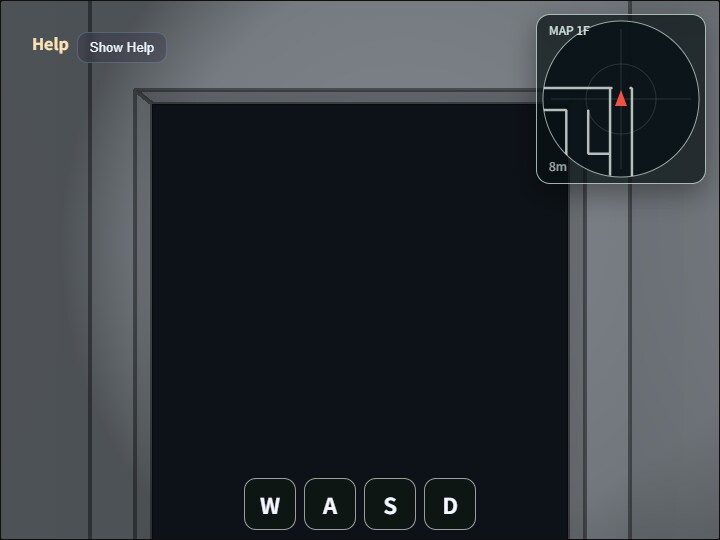
maze is a walk-through sample with first-person movement, collision resolution, a view-locked spot light, Compute Effects, and a radar display. The maze is generated at runtime.
main.js builds a seeded 15×15-cell DFS maze and assembles floors, walls, the ceiling, doorway side jambs, and top lintels from Primitive.cuboid(). It does not load a fixed ModelAsset.
The maze has one floor. The corridor grid width is 2.5m, wall thickness and ceiling thickness are 0.1m, the ceiling underside is 3.0m above the floor, the player base is at y = 0.0, and EyeRig.eyeHeight = 1.6m. Because wall thickness is counted inside the corridor module, the clear walking width is about 2.4m.
Floor colors are split into normal corridor, room, start area, and goal area. After the maze is carved, several 2 x 2 cell or larger rooms are stamped over it, their inner walls are removed, and room entrances are created with width 2.0m and height 2.4m. The top lintel height is 0.55m, leaving a 0.05m gap below the 3.0m ceiling underside.
The radar uses the same heading-up method as walk_around and draws nearby collision segments on a 2D canvas in the top-right corner. The doorway lintel stays above the player collision cylinder, so it does not appear as a blocking segment and it does not show up on the radar. The side jambs remain collision targets.
Detailed rules for maze generation, rooms, doors, collision handling, and radar display are documented in maze_spec.md.
How to run
- Open
./maze.html - Use a WebGPU-capable browser
- On desktop, use drag and keyboard input. On smartphones, use drag and the on-screen
W/A/S/Dbuttons - Double tap / double click the canvas, or press
/, to open the command palette
webg features used
WebgApp: initialization, draw loop, HelpPanel, HUD, FrameTimerShape/Primitive.cuboid(): procedural construction of floors, walls, ceiling, doorway jambs, and lintelsEyeRig:first-personmovement, view rotation, and run inputCommandPalette: compact controls for Compute Effects and spot light settingsComputeEffectPipeline: SSAO, Shadow, SSR, Toon, DoF, Bloom, and Edge renderingFullscreenPass: copies the final effect result to the canvasCollisionWorld/WalkCollisionBuilder: extracts collision segments from procedural wall cuboids and resolves player movement- DOM
canvas: overlays the heading-up radar from the current collision segments
Controls
- Horizontal drag: rotate heading and view together
- Vertical drag: look up or down only while dragging, then return to level
W/S: move forward / backwardA/D: turn left / rightShift: run5/6: decrease / increase Toon levels in the range 2 to 80: reset to position[-2.5600, 0.0, 6.0572], eye height1.60m, and yaw-29.91°K: save a screenshot- Double tap / double click the canvas, or
/: open or close the command palette
What to verify
- Reset returns to
[-2.5600, 0.0, 6.0572], the same row, column, and relative in-cell position as maze2, with yaw-29.91° - Horizontal drag rotates heading and view together, while vertical drag only affects temporary look pitch
W/A/S/Dbehave as first-person controls, not orbit camera controls- Walls and doorway side jambs block movement, while doorway openings remain passable
- The top-right
MAPshows the current forward direction upward and nearby collision segments as white lines - Floor color changes between corridor, room, start, and goal areas
- Reloading the page regenerates the same maze shape because the seed is fixed
- Edge is enabled and Toon is disabled at startup, and Compute Effects can be changed from the palette
Files
maze.html: demo pagemain.js: maze generation, first-person movement, Compute Effects, and radarCollisionWorld.js: XZ-plane collision world for the player cylinderWalkCollisionBuilder.js: helper that extracts collision segments from wall shapesmaze_spec.md: detailed specification for maze generation, rooms, doors, collision handling, and radarREADME.md: Japanese guideREADME.en.md: English guide