texture_catalog
English | 日本語
Overview
texture_catalog selects and edits Procedural Texture presets provided by the webg core. It previews each material on a cube and as Color/Height/Normal maps, exports the complete definition as JavaScript or JSON, and saves generated Color/Height/Normal maps as PNG or JPEG images.
Running
Start an HTTP server at the repository root and open samples/texture_catalog/texture_catalog.html.
python3 -m http.server 8000Minimal API
import ProceduralMaterials from "../../webg/ProceduralMaterials.js";

const materials = new ProceduralMaterials(gpu);
const oak = await materials.createPreset("wood.oak.plank");
oak.applyTo(shape);
The Shape must already contain UV coordinates. One material handle may be applied to multiple Shapes. Call materials.destroy() to release all generated GPU resources when the owner ends.
Initial presets
The core provides twenty-three presets across wood, concrete, fiber-cement, brick, vinyl, ceramic, resin, and stone. They cover thirteen recipes including quarter-sawn, flat-sawn, and board-by-board mixed grain. Oak, Walnut, and Cedar provide flat-sawn and mixed variants; each mixed variation cell assigns half its boards to each cut.
Rounded pebbles and gravel
Select the stone category to find three presets:
| Preset ID | Content |
|---|---|
stone.pebbles.gray | Large rounded pebbles only; 40mm height bound |
stone.pebbles-gravel.gray | Pebbles with small gravel in the gaps; 6mm gravel height bound |
stone.gravel.gray | Small gravel only; 6mm height bound |
Each uses the pebbles pattern on a seamless 2 m square with no joints.Pattern scale m sets the placement scale rather than a fixed diameter for every grain.
The large and small scales are 0.12m and 0.065m; the seed varies radius, aspect and orientation.
Grain tones span a continuous range from dark through midtones to light.Color amount controls grain color contrast independently of Pattern height m.
Dark grains also rise upward. The pebble controls set density, roundness (0: flat top; 1: rounded cap),
plus the amount, scale, height and color contrast of gravel in the gaps.
Changing roundness leaves the Color map unchanged. Packing narrows gaps by adjusting grain size and center jitter.
Irregularity (0–1) increases center jitter and variation in radius and aspect.
The pebbles-only preset uses irregularity, density and packing of 1, with raised centers and a 40mm height bound. Set gravel amount to 0 for a single grain layer.
const stones = await materials.createPreset("stone.pebbles-gravel.gray", {
  tile: { pattern: {
    colorAmount: 0.10, heightMeters: 0.040,
    pebbles: { roundness: 1, gravelAmount: 1, gravelHeightMeters: 0.006 }
  } }
});
stones.applyTo(shape);
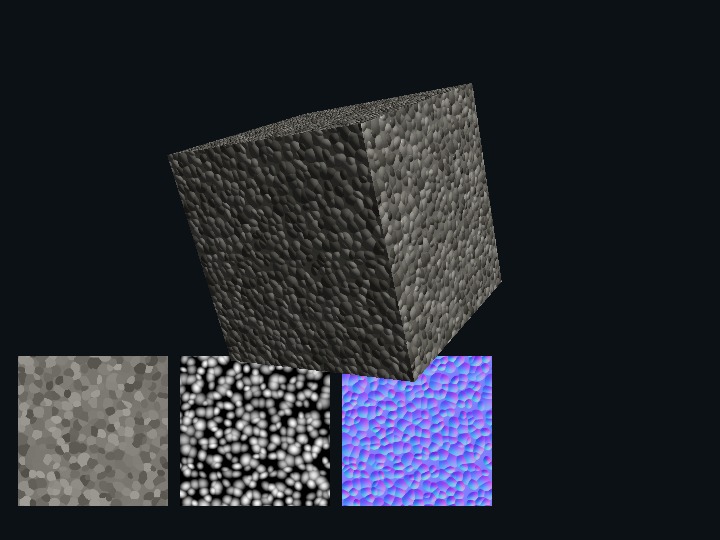
The previews show Color, Height and Normal in that order. Height is normalized to the material'sheightRangeMeters; check the displayed Height range when decoding the downloaded Height image.
Use PNG when reusing Height or Normal maps. The cube uses normal mapping and retains its geometric outline.
Applications that need actual relief must decode Height and intersect the resulting height field.
Editing and exporting
The editor exposes resolution, base/dirt/joint colors, tile-to-tile color variation, physical unit dimensions, long-axis direction, variation-cell counts, joints, layout, pattern, surface detail, random seed, roughness, specular, metallic, and Normal strength. Thickness m is saved in the definition as a reference dimension for the material. Pattern and surface-detail settings control the relief in the generated images. Changes immediately update both the displayed code and the GPU textures. Generate or the G key manually rebuilds the same definition.
Definition metadata exposes editable Material ID, Category, Japanese and English Label, and Tile preset ID fields. The first Category field filters the existing preset list; the Category field under Definition metadata is the category saved in the exported definition. Select an existing preset first, then change these values to create a separate material definition based on the same tile and appearance settings.
To try fine sand-like roughness on concrete, keep the mottle Pattern as the broad color variation and adjust Surface detail scale m from 0.010 to 0.0125 and Surface noise height m from 0.00020 to 0.00030. Pattern scale m controls the size of the color mottling, Color amount controls its color contrast, and Surface noise height m controls the physical relief separately. pixelsPerMeter specifies the number of pixels available to record detail. Surface noise height m specifies relief height. Try 400 pixels/m only when detail is lost at 200 pixels/m.
For example, setting the metadata for fiber cement siding produces the following beginning in the JavaScript output. The rest of tile continues with the complete values edited in the page.
export default {
  "id": "fiber.cement.siding",
  "schemaVersion": 1,
  "category": "cement",
  "label": {
    "ja": "窯業系サイディング",
    "en": "Fiber cement siding"
  },
  "tile": {
    "presetId": "fiber.cement.siding",
    // complete resolution, unit, layout, color, and pattern values
  }
};
This sample exports definition files for review and reuse. To add the exported definition as a core preset or replace an existing preset, review the file and apply it to the core separately.
The stack layout always uses a row offset of 0. When changing to running-bond while the row offset is 0, the editor selects the standard 1/2 offset so the layout difference is visible. You can then change the running-bond offset to 0, 1/3, or 1/4 and regenerate with that value.
The initial wood layouts are running-bond with 1/2 for Oak, 1/3 for Walnut, and 1/4 for Cedar. Walnut uses a 2-by-6 variation cell so the 1/3 offset period closes correctly.
Dimensions, layout, and reflection
| Control | Effect |
|---|---|
| Pixels per meter | Generation resolution. Unit dimensions, joint width, and edge round are aligned to integer pixels at this resolution |
| Long/Short size m | Long and short dimensions of one unit. These affect one texture period and real-size repeats |
| Thickness mode/Thickness m | Reference thickness saved with the definition. Pattern and surface-detail settings control the generated image relief |
| Long axis | Assigns the long dimension to texture u or v |
| Variation columns/rows | Number of different unit variations placed in the generated texture |
| Joint edge round m | Rounding distance from the joint bottom back to the unit surface |
| Dirt color/Dirt amount | Color and amount of dirt added to the unit surface |
| Metallic | PBR material metallic value |
Pattern and noise
| Control | Effect |
|---|---|
| Tile color variation | Brightness difference shared by each tile or board. 0 makes tiles uniform; larger values increase the color change between tiles. The valid range is 0 to 0.25 |
| Pattern scale m | Base size of material-specific wood grain, veining, mottling, or particles. Smaller values make the pattern finer; larger values make it coarser |
| Pattern color amount | Brightness amplitude contributed to the Color map by the pattern |
| Pattern height m | Physical relief amplitude contributed by the pattern to the Height/Normal maps |
| Surface detail scale m | Base size of the shared Perlin detail layer, independent of the material pattern |
| Surface noise height m | Fine physical relief contributed by surface detail to the Height/Normal maps |
| Random seed | Reproducible integer that changes board variation, Perlin noise, Voronoi points, Terrazzo chips, and related placement |
Pattern and surface detail are separate layers. To change only wood-grain spacing, edit Pattern scale m. To retain the grain while changing fine roughness, edit Surface detail scale m and Surface noise height m. The same seed and settings regenerate the same texture.
Numeric input and shortcuts
Every numeric field supports direct typed entry as well as its spin buttons. While a numeric field has focus, ↑/↓ changes it by the following step. Outside the editor panel, ↑/↓ continues to control the camera.
| Numeric field | ↑/↓ step |
|---|---|
| Pixels per meter | 1 |
| Long/Short size, Joint width | 0.005 m |
| Joint edge round | 0.0001 m |
| Joint depth | 0.0001 m |
| Pattern scale, Surface detail scale | 0.0025 m |
| Pattern color amount | 0.005 |
| Pattern height, Surface noise height | 0.00001 m |
| Random seed | 1 |
| Dirt amount | 0.005 |
| Metallic, Roughness, Specular | 0.01 |
| Normal strength | 0.05 |
G performs the same operation as the Generate button, both over the Canvas and while a numeric field has focus. Ctrl+G, Command+G, and Alt+G remain available to the browser or operating system. Each key press starts generation once.
While typing a number, the editor updates the displayed code and starts GPU generation when the value is committed. The ↑/↓ spin buttons also generate after the value is committed. This prevents a decimal such as 0.01 from being committed prematurely at 0 or 0.. Values outside the step, min, max, or exact-pixel constraints are rounded to the nearest input-acceptable value, and the info area reports the adjustment.G is inserted as a character in text inputs and textareas; in other controls and over the Canvas it remains the Generate shortcut.
Copy Code and Download JS emit a complete ES-module definition without omitted defaults. Download JSON saves the same definition and Import JSON loads it again. Numeric values outside the step, min, max, or exact-pixel constraints are rounded to the nearest input-acceptable value and reported in the info area.
Under Texture images, choose PNG or JPEG and download the Color, Height and Normal maps separately at their original generated pixel dimensions. Wait for automatic generation to finish after changing a setting before downloading. PNG is lossless. Use PNG when reusing a Normal map as material input so compression does not alter its channel values.