shapes
English | 日本語
Overview
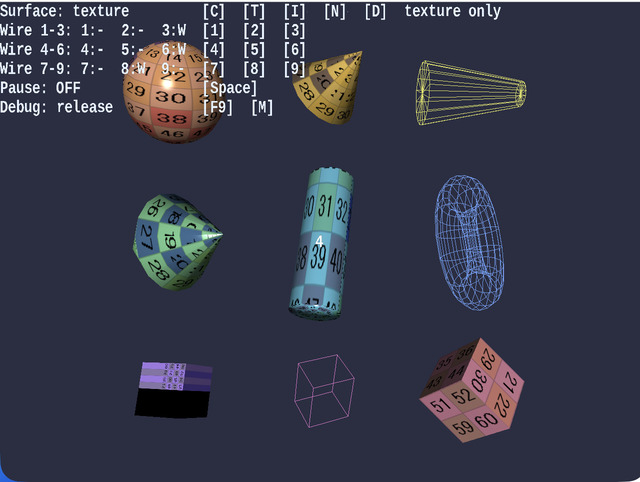
- Among the primitive-oriented samples, this is the main entry point for comparing the appearance of textures, image-based normals, and procedural normals in one place
- You can compare "textured appearance", "normal-map differences", and
wireframewhile keeping the same composition Messageis used only for the numbered labels in the3x3layout, while operation guidance and status display are handled by the standard HUD on theWebgAppside
How to Run
- Open ./shapes.html
- Use a browser with WebGPU support, and check the help panel and HUD together with the sample when needed
webg Features Used
Primitive: generates basic shapes such as sphere / cone / donut / cubeShape.setWireframe: toggles wireframe displayTexture: loadsnum256.pngTexture.buildNormalMapFromProceduralHeight: generates noise / dots normal mapsSmoothShader: handlestexture + normal mapandwireframethrough the same entry point. Flat shading can also be toggled as a function on the shader sideMessage: overlays only the primitive number labels in the3x3arrangement
Checkpoints
- When switching the surface mode with
C / T / I / N / D, confirm that only the differences between texture / image normal / procedural normal change while the geometry stays the same - Confirm that texture comparison with
T, image-normal comparison withI, and procedural-normal comparison withN / Dcan all be read within the same sample - Confirm with the
1 - 9wireframe toggles that the topology is as expected, and that line display does not break even when the surface mode changes - Confirm that across the nine shapes, including
cube / cuboid / mapCube, both texture and normal comparison remain usable without severe breakage
Controls
C: solid-color displayT: texture displayI: image-normal displayN: noise-normal displayD: dots-normal display1 - 9: toggle wireframe for the corresponding shape on or offSpace: pause or resume rotation- Touch buttons:
C / T / I / N / D,1 - 9, andPauseuse the same key names as the keyboard controls