gltf_loader
English | 日本語
Overview
- This sample loads the glTF / GLB file specified in
main.js, normalizes it intoModelAsset, and then displays it - It calls the glTF facade from
WebgApp.loadModel(), so you can inspect the flow in whichModelAssetdata and runtime objects are assembled internally - The loaded
ModelAssetcan be downloaded as a JSON file with theDkey - For glTF files that have a static parent-node transform, the importer side bakes parent rotation and parent scale for skinned meshes so that runtime complexity is not increased
- When exporting glTF / GLB from Blender, the loader assumes files are exported in
Y-up - The loader's model-origin policy uses the skeleton root as the origin for skinned models and the mesh node as the origin for non-skinned models
How to Run
- Open ./gltf_loader.html
- Use a browser with WebGPU support, and check the Help Panel and CommandPalette together with the sample when needed
webg Features Used
WebgApp: standard initialization, render loop, and Help Panel displayCommandPalette: groups animation control, wireframe, screenshot, JSON export, and camera resetWebgApp.loadModel: high-level entry point for the glTF facadeModelLoader: normalizes glTF / GLB intoModelAssetand bundles build / instantiateModelAsset: holds validated data and supports JSON downloadModelAsset.getClipNames: inspects the clip list before buildModelBuilder: builds shapes, skeletons, and animations fromModelAssetModelBuilder.animationMap: accesses runtime animations from clip IDsbuild()result helpers:instantiate() / createNodeTree() / bindAnimationBindings() / getAnimation() / getAnimationNames() / restartAnimation() / pauseAnimation() / resumeAnimation() / startAllAnimations() / playAllAnimations() / setAnimationsPaused()EyeRig(type="orbit"): orbit viewpoint based on the world bounding box
Processing Flow
- The sample calls
WebgApp.loadModel(GLTF_FILE, { format: "gltf" ... })and enters the glTF facade from the format dispatch in the loader ModelLoaderreads the file and hands parsing and normalization toGltfShapeGltfShapealigns materials, meshes, skeletons, animations, and nodes intoModelAssetformat- At that stage, glTF files with static parent-node transforms run
buildStaticBakePlans(), and parent rotation / parent scale are baked into meshes, skeletons, and animations for skinned meshes - For non-skinned meshes, the path that handles static uniform scale as geometry bake remains available, while runtime nodes can also handle uniform scale
ModelBuilderthen constructs the runtimeShape / Skeleton / Animation / Nodeobjects fromModelAsset
How to Read the Downloaded JSON
meta.sourceis expected to beglTF, andmeta.upAxisis expected to beYmeshes[].meta.staticBakeappears only on meshes to which the importer applied static bakemeshes[].meta.bakedNodeIndexis the index that shows which glTF node transform was baked into the geometryskeletons[].meta.staticBakeis recorded when a parent transform bake was inserted on the root-joint side of a skinned meshnodes[].matrixis the structural transform left for runtime use, and becomes identity on nodes whose skinning bake has already been applied- Looking at
nodes[].animationBindingsandanimations[].targetSkeletonlets you follow which clip is connected to which skeleton gltfNodeIndexandgltfSkinIndexlet you trace the relationship between JSON-side nodes and the original glTF nodes / skins afterward
Checkpoints
- Confirm that the file specified by
GLTF_FILEis loaded and that shapes, skeletons, and animations are built correctly - Confirm that with a single facade call, glTF node restoration and animation binding can use the same shared helpers as other formats
- Even for glTF containing skinned meshes, confirm that static parent rotation and uniform scale are baked on the importer side so that static meshes and skinned meshes do not end up with drastically different orientation
- Confirm that the
ModelAssetJSON saved with theDkey keepsstaticBakemetadata so you can later inspect which nodes / skeletons were baked - If the raw glTF animation samplers contain
CUBICSPLINE, confirm that they are converted toLINEARby removing intermediate values and that the Interpolation Notice and Help Panel show information equivalent toanimationInterpolation=LINEAR converted=CUBICSPLINE->LINEAR:... - Even when loading a large glTF / GLB, confirm that the Load Progress panel shows
stage=...during startup so you can at least see how far the load process has progressed - For Rigify-style models, confirm that in addition to
required=..., the fieldshelperWeighted=...,helperAncestor=..., andhelperPruned=...let you judge whether helper bones are actually used by weights, kept only to preserve hierarchy, or already baked away and removable by the importer - Confirm that the Help Panel shows
file / model / orbit / target / anim / clip0 / interpolation / wireframestate so the necessary viewer state can be followed on screen - Confirm that the first clip can be restarted by name with
restartAnimation(clipId)using the1key - Confirm that
2 / 3can pause and resume the first clip individually withpauseAnimation(clipId)/resumeAnimation(clipId) - Confirm that the camera distance is set automatically from the world bounding box that includes parent transforms on glTF nodes, so the entire model is visible in the initial framing
- Confirm that the JSON exported with the
Dkey can be passed tojson_loaderand displayed again - Confirm that
Shift + ArrowandShift + Dragmove the camera target in parallel so fine details can be brought to the center - Confirm that
Wtoggles wireframe,Ssaves a screenshot, andRreturns to the initial framing - Confirm that the CommandPalette can run animation replay / pause / resume, wireframe, screenshot, JSON export, and camera reset
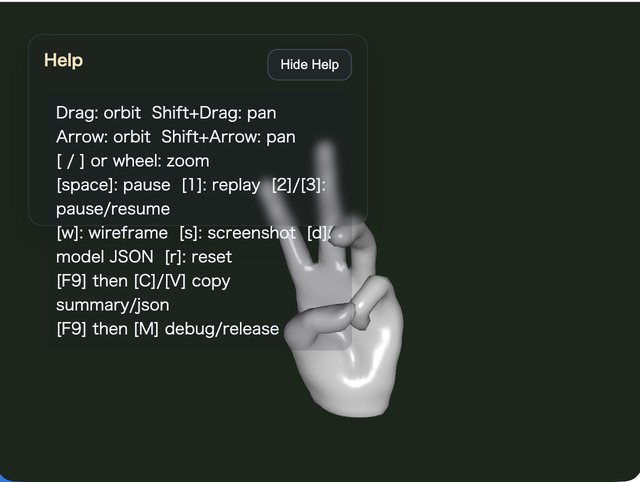
- Confirm that the Help Panel is used for current values and operation hints, while the CommandPalette is used for changing settings and running commands
Reading Points for AI / Users
- If "the display looks correct but you cannot tell where scale was applied", inspect
meshes[].meta.staticBakeandnodes[].matrixfirst - If "animations exist but do not play", inspect the relationship between
animations[].targetSkeletonandnodes[].animationBindings - If "a clip does not play", compare the Help Panel
Anim / Clip0display with the bindings in the JSON - If "the orientation of a skinned mesh with a parent node looks suspicious", check whether
skeletons[].meta.staticBakeis present and whether the asset contains scale animation or non-uniform scale
Controls
- Drag / arrow keys: orbit camera rotation
Shift + Drag / arrow keys: pan the camera target- Mouse wheel /
[ / ]: zoom Space: pause animation1: replay the first clip2: pause the first clip3: resume the first clipW: toggle wireframeS: save a screenshotD: download theModelAssetJSONR: return the camera to the initial position based on the bounding box/or double tap the canvas: open the CommandPalette