fantasy — Starfall Keep
English | 日本語
Overview
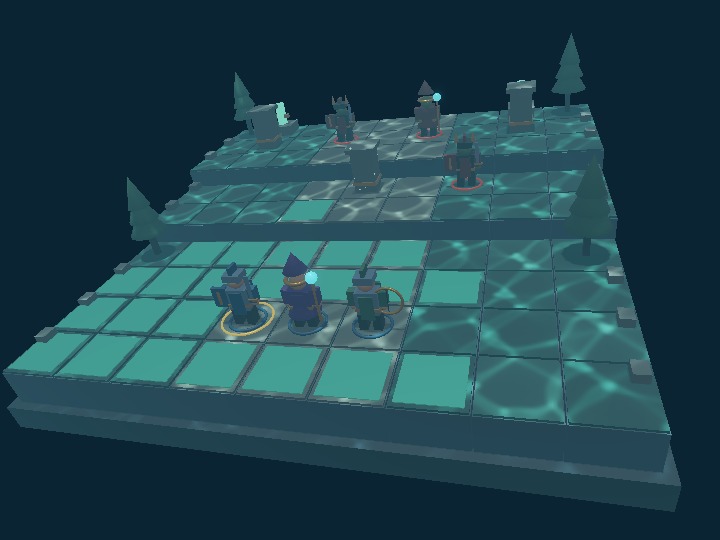
A small turn-based battle on a 9×9 map with three elevation levels. Command a knight, mage, and ranger against three enemies. This sample adds moving Nodes, picking, DOM controls, GPU particles, victory, defeat, and restart to a PBR scene.
Primitive geometry builds the characters, and parent-child Nodes connect their limbs and equipment.
The keep is submerged. Core caustics illuminate terrain, scenery, and moving units; blue-green light, distance fog, and drifting particles give the battlefield an underwater atmosphere. Toggle 水中のコースティクス (Underwater Caustics) to compare the moving illumination. Underwater colors and fog remain when caustics are off.
Run and controls
Open fantasy.html in a WebGPU browser. Serve the repository over HTTP using localhost or HTTPS. Startup prepares PBR and GPU particles.
- Select an ally in the 3D scene or party panel.
- Click a cyan tile to move.
- Click an enemy within range to attack.
- Command the remaining allies and press 味方ターンを終了 (End Ally Turn).
Each ally can move once and attack once per turn, but movement must come first. An attack made without moving ends that unit's actions. After moving, attack or choose 待機 (Wait) to finish that unit's turn. Enemies move into attack range, then target the available ally with the lowest HP.
Movement uses four neighbors and permits one elevation step. Climbing costs 2 movement points; level and downhill movement cost 1. Living units and obstacles block movement. Attacking from higher ground adds 3 damage. Range uses Manhattan distance; ranged attacks pass over obstacles and always hit.
Defeat all enemies to win; losing every ally ends the battle. 最初から (Start Over) and もう一度戦う (Fight Again) restart it. Expand マスをボタンで操作 (Use Grid Buttons) to control the map with Tab and Enter; these buttons trigger the same actions as 3D picking.
Drag to rotate and use the wheel to zoom. The initial view uses perspective projection. Canvas size is 960×720 on large screens; narrow screens reduce its width and place the controls below it.
webg features
WebgSceneAppstarts PBR and GPU particles from a manifest object with the SceneDefinition structure. Game updates useonUpdate({ deltaSec }).Shape,Primitive, andNodeform characters and equipment. Moving the parent moves its children; rotation differences animate the limbs.- PBR materials,
blue-skyenvironment lighting, a blue vertical directional light, shadows, Bloom, and Fog distinguish terrain, armor, and crystals. WaterBodyandPbrRenderer.setWater()add wave-generated caustics to terrain and the diffuse PBR lighting of moving units. The water surface is hidden to keep tactical tiles clear.Space.raycast()picks terrain and character AABBs from a Reverse-Z pointer ray.ComputeParticleEmitterhandles footsteps, magic, sparks, and ambient light. The standard app handles simulation and PBR composition.
The app uses physics:false. Movement and attacks use grid rules; Node transforms animate motion and character parts.
Verification points
- Select Rio and move to column 4, row 5, elevation 1 on the grid. This uses 4 movement points, including the climb from elevation 0 to 1.
- Watch limb motion, vertical motion, and particles at each step. Input remains disabled until animation finishes and the logical tile position is committed.
- Finn has range 4 and Luna range 3. Clicking an out-of-range enemy shows a message without changing HP.
- Check attack trails, impact particles, hit motion, HP, and defeated units disappearing.
- Enemy attacks from higher ground show 高所 +3 (High Ground +3) in the log. Allies regain their actions next turn.
- Restart restores HP, positions, turn, log, and particles while reusing GPU resources.
- Rotate and resize the view; labels and picking should remain aligned with the 3D scene.
- Toggle caustics and check that moving units, attacks, and turn progression continue correctly.
Read the code in this order
- `main.js`: `start()` — initialize through one entry point, add moving Nodes and input, then start frames. WebgApp runs the render loop and particle steps.
- `scene.js`: `createManifest()` — read initial placement, materials, PBR, and emitters. Grid coordinates and display height come from
rules.mjs. - `visuals.js`: `part()` and `character()` — examine RGBA/PBR material parameters, Node hierarchy, and ownership of manually created Shapes.
- `main.js`: `choose()` → `move()` → `updateMotion()` — select a tile, await animation, and commit coordinates.
rules.mjs:paths()includes uphill movement costs. - `main.js`: `makePointerRay()`, `pickTile()`, `updateLabels()` — use the same camera for picking and DOM projection.
- `FantasyApp.js` and cleanup — synchronize CSS, Canvas, and PBR sizes, then release the observer, manual Shapes, and standard app separately.
The reset() function in main.js restarts this game. It is distinct from WebgSceneApp.reset(); HP and action flags belong to the game.
Underwater lighting
connectWater() in main.js creates an 18m-wide, 18m-deep WaterBody, with its mean surface at 6m. Terrain and unit root Nodes are receivers; child Shapes inherit registration, including animated limbs and equipment. Movement markers and the selection ring are excluded. update() advances only the shared wave time through setTime().
await sceneApp.renderer.setWater(water, {
  causticsEnabled: true,
  surfaceEnabled: false,
  quality: "high"
});
When the caustics control changes, its handler pauses rendering while it awaits setWater(), then resumes the app. Turning caustics off releases the dedicated GPU resources. Turning them on again preserves the battle state and registered Nodes; restarting the battle reuses the same water body.
Caustics, teal lighting, and distance fog create the underwater atmosphere:
Change one thing at a time
- Set
palette.steel.roughnessinvisuals.jsfrom 0.28 to 0.65, then rotate the camera to compare highlights. Shared terrain materials live inscene.js. - Set Rio's
moveinrules.mjsfrom 4 to 3. Column 4, row 5 should no longer be reachable from the initial position. Paths and cyan markers share the same result. - Increase the segment
durationinmain.js:move(). Keep combat values unchanged and check input locking and coordinate commitment. - Change both RGB entries of
steps.appearance.colorsinscene.js. Keep emission positions and paths unchanged.
After each change, use the verification points to compare its effect with the starting behavior.
Camera reference and rule checks
camera_reference.json records the initial camera reference. The book's From a PBR Scene to a Small Game explains how the individual feature examples connect in this app.
Run from the repository root to check paths, occupancy, range, enemy planning, and outcomes without a GPU. Rendering and interaction require separate browser verification.
node --test samples/fantasy/rules.test.mjs