eye_rig
English | 日本語
Overview
This sample verifies the responsibilities of Orbit, First Person, and Follow modes and the effect of application-defined scene hierarchies using the base -> rod -> eye EyeRig structure.
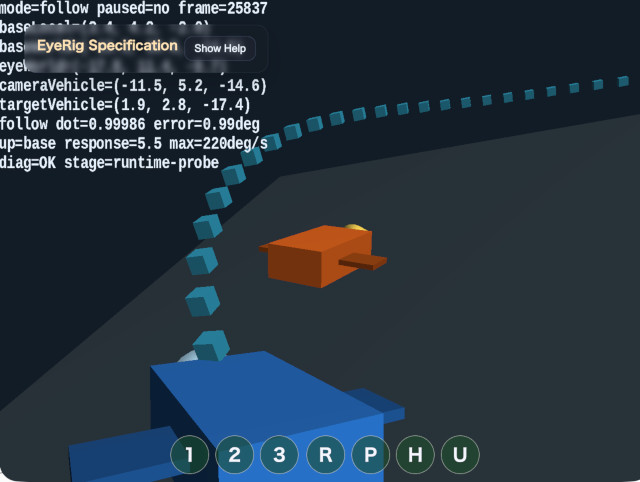
The blue camera vehicle and orange target vehicle travel along a banked three-dimensional track. Orbit and First Person demonstrate camera placement relative to the camera vehicle. Follow keeps the camera base attached to the camera vehicle while only the eye orientation smoothly tracks the independently moving target vehicle.
The specification verified by this sample is implemented in webg/EyeRig.js. The sample uses the core EyeRig directly to demonstrate Follow, Orbit world-to-local conversion under a rotated parent, and independent First Person lookYaw input.
How to Run
- Open ./eye_rig.html
- Use a WebGPU-capable browser and inspect the Help panel for controls and current values
- Press
/or double tap the canvas to open the CommandPalette for mode and setting changes
webg Features Used
WebgApp: initializes Screen, Space, the camera rig, InputController, Message, OverlayPanel, and diagnosticsEyeRig: supplies all three mode states, input handling, world-to-local conversion, and Follow orientation trackingCoordinateSystem: composes the camera vehicle hierarchy and the rotation-independent camera anchorShape / Primitive: draws the track markers and two vehiclesbuildHelpPanelOptions(): presents the specification and controls in a collapsible panelCommandPalette: groups mode switching, pause, reset, Orbit hierarchy, and Follow up-reference controls
Checkpoints
In Orbit mode, press H to compare a camera base parented to the vehicle with one parented to a non-rotating anchor that only shares its position. This demonstrates that inherited rotation is selected by the application hierarchy rather than by a different Orbit mode.
In First Person mode, the base starts behind, above, and slightly to the right of the camera vehicle. The camera body faces local -Z, while the vehicle faces local +Z, so bodyYaw: 180 aligns their forward axes. W moves along the body local -Z rotated by bodyYaw, D moves along local +X, and S / A move in the opposite directions. Horizontal dragging changes eye.lookYaw, not bodyYaw, and lookYaw does not change the movement direction. This allows the view to turn while the vehicle heading remains unchanged. Q / E move the base vertically in its parent coordinate system.
In Follow mode, the base stays attached to the camera vehicle and is never copied to the target position. The rod preserves the application-controlled composition, while the eye stores the dynamic local orientation that looks at the target vehicle. A follow dot value near 1 in the Help panel means that the eye world-forward direction matches the target direction.
Press U to compare base, rod, and world up references. When the target direction is nearly parallel to the selected up direction, the sample projects the previous right axis onto the new view plane to preserve roll continuity.
Follow interpolates orientation with a frame-rate-independent response and a maximum angular speed. It does not delay the target position itself.
Controls
1: Orbit2: First Person3: FollowR: reset the active modeP: pause or resume both vehiclesH: toggle Orbit hierarchy between inherited and independent rotationU: cycle Follow up reference throughbase / rod / world- Drag: Orbit rotation, First Person independent look, or Follow rod composition
Shift + Dragor two-finger drag: Orbit pan- Wheel or pinch: Orbit or Follow reference distance
W / A / S / D: move the First Person baseQ / E: move the First Person base down or upShift: increase First Person movement speed/or canvas double tap: open the CommandPalette
Implementation Files
main.js: scene, vehicle paths, mode switching, UI, and diagnosticseye_rig.txt: detailed implementation notes for users and coding assistantsbook/06_カメラ制御とEyeRig.md: Chapter 6, shared by the core implementation and camera-control examples