compute_vignette
English | 日本語
Overview
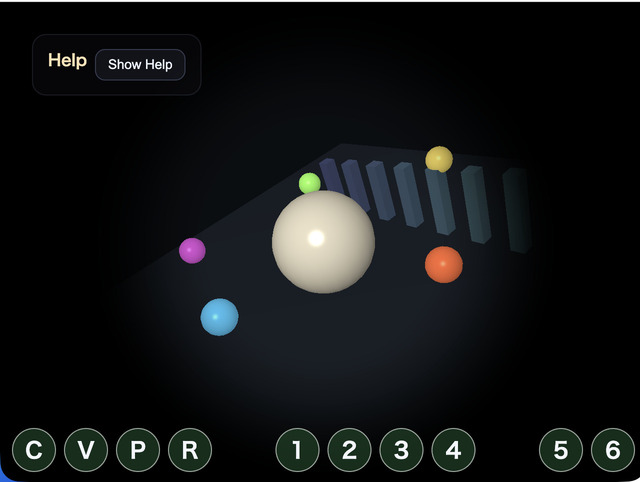
Vignette is a basic postprocess that keeps the center of the image bright while gradually darkening the edges, guiding attention toward the middle of the screen. This sample implements the same kind of effect as the existing VignettePass, but runs it as a single compute-shader dispatch instead of a fragment-shader fullscreen pass.
The frame first renders the normal 3D scene into an offscreen RenderTarget. The compute shader then reads that color texture, lets one invocation handle one pixel, calculates attenuation from center distance, radius, softness, and strength, and writes the result to an rgba8unorm storage texture. Finally, FullscreenPass samples that storage texture and displays it on the canvas.
This is useful because it is the smallest safe shape of a compute postprocess. The input texture, uniform buffer, output storage texture, and dispatch size can all be checked in one stage before moving on to multi-pass effects such as Bloom or DoF. The sample-side connection code remains outside the webg core, and the core VignettePass is not changed.
How to Run
- Open ./compute_vignette.html
- Use a browser with WebGPU support, and check the help panel and HUD together with the sample when needed
Checkpoints
Press C to toggle Compute Vignette and confirm that only the postprocess changes while the scene stays the same. Press V to switch between the original scene and the compute output, which lets you compare the offscreen render target with the storage texture result directly.
radius controls where the darkening begins, softness controls how wide the falloff band is, and strength controls how dark the outer area becomes. The shader compensates for aspect ratio so the vignette does not collapse into an obvious ellipse on wide screens. Resize the viewport as well and confirm that the output texture follows the screen size.
Use this sample as the entry point for understanding full-screen compute effects. It shares the same runtime as samples/compute_edge, so the WGSL and uniform packing are the main pieces that change when building another one-dispatch effect.