compute_effect
English | 日本語
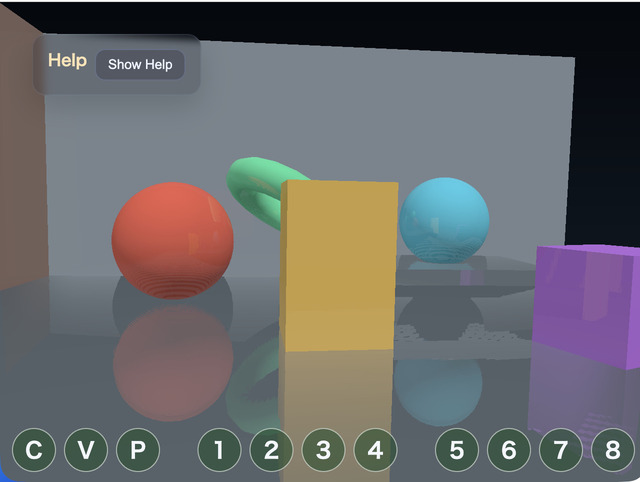
Overview
compute_effect demonstrates the integrated rendering path provided by ComputeEffectPipeline. The application builds an ordinary scene from Space and Shape, then gives the Pipeline the frame state and effect settings. The Pipeline owns the order from the G-buffer through Shadows, Ambient Occlusion, Deferred and Local Lighting, SSR, transparency, Fog, High Dynamic Range post effects, Tone Mapping, Edge, Vignette, and final presentation.
The sample uses the integrated API from WebgApp and does not construct low-level bind groups, storage textures, or Camera Reverse-Z reconstruction formulas.
Processing Flow
The rendering order is:
WebgApp fixes the camera state once for the frame
  -> GeometryBufferPass
       albedo / view-space normal / surface material / Camera Reverse-Z depth
  -> ShadowMapPass or SpotShadowMapPass
  -> ComputeShadowPass / ComputeSpotShadowPass
       produce shadow visibility rather than a finished color
  -> SsaoPass
       produces ambient-occlusion visibility
  -> DeferredLightingPass
       evaluates directional / spot / point and cone Local Lights and visibility once
  -> ComputeSsrPass
       produces a linear High Dynamic Range reflection
  -> ComputeEffectComposer
  -> TransparencyPass (when transparent Shapes exist)
  -> ComputeFogPass (optional)
  -> ComputeToonPass (optional)
  -> ComputeDofPass (optional)
  -> ComputeBloomPass (optional)
  -> ComputeEffectToneMapPass
       applies exposure, tone mapping, and gamma conversion once
  -> ComputeEdgePass (optional)
  -> ComputeVignettePass (optional)
  -> FullscreenPass
       presents to the canvas in a depth-free presentation pass
The normal camera uses Reverse-Z in a depth32float texture. Directional and spot Shadow Map generation intentionally retain standard Z because they render a separate Light View. The Pipeline distinguishes both depth conventions internally, so the sample does not switch depth signs or comparison rules.
G-buffer and Materials
The version 2 G-buffer does not store a pre-lit color. It reads the following explicit values from every Shape:
color: unlit albedospecular: specular strength, also used by SSR reflection selectionroughness: surface roughnessmetallic: metallic responseemissive: light-independent emission
The floor, walls, sphere, cubes, pillar, and torus all provide these values explicitly. Reflectivity is stored in specular, and direct-light specular is not added to the G-buffer color. Deferred Lighting reads albedo, normal, surface material, lights, shadow visibility, and ambient occlusion, then evaluates lighting once with a GGX-style reflection model.
The reflectivity palette control updates specular for the moving objects. Their roughness and metallic values remain distinct, so equal specular strength can still produce different reflection sharpness and material appearance.
Sharing One Frame
WebgApp fixes the camera state once per rendered frame and gives the same frame object to onBeforeDraw and onAfterDraw3d. The sample passes that object to both renderScene() and encode().
onBeforeDraw: ({ cameraFrame }) => {
  pipeline.renderScene(app.space, cameraFrame, app.clearColor, {
    shadowEnabled: state.shadowEnabled,
    timestampWrites: app.getGpuRenderTimestampWrites(true, true)
  });
},

onAfterDraw3d: ({ cameraFrame }) => {
  const finalColor = pipeline.encode(gpu.commandEncoder, {
    cameraFrame,
    shadowEnabled: state.shadowEnabled,
    ssaoEnabled: state.ssaoEnabled,
    ssrEnabled: state.ssrEnabled
  });
}
This prevents the G-buffer, screen-space effects, and Deferred Lighting from reading different camera positions or projections. Reconstruction parameters come from CameraFrame; the sample does not create them from projection near/far values or clone the eye World Matrix.
Final Presentation and HUD
The rgba8unorm texture produced after Tone Mapping is presented to the canvas in a render pass without a depth attachment.
app.screen.beginPresentPass({
  clearColor: app.clearColor,
  colorLoadOp: "clear"
});
copyPass.draw(finalColor);
WebgApp draws Font and HUD content afterward. The Font pipeline requires a depth32float attachment, so the sample reopens a Camera Reverse-Z depth pass while preserving the displayed color.
app.screen.clearDepthBuffer();Drawing the fullscreen copy in a normal depth pass, or drawing Font in the depth-free presentation pass, fails WebGPU attachment validation. These two passes separate presentation and HUD attachment responsibilities; they are not a color fallback.
How to Run
- Open ./compute_effect.html in a WebGPU-capable browser
- Double-tap the canvas or press
/to open the CommandPalette - Drag to orbit the camera
Controls and Checkpoints
The CommandPalette uses eight pages of up to ten rows. Next always occupies the rightmost cell of the first row, so page navigation stays in the same position while the full-width controls change. Bloom occupies Pages 7 and 8, where every Pyramid option exposed by compute_bloom can be adjusted independently.
- Page 1: Shadow, SSAO, SSR, lighting color and strength, reflectivity, SSR composition, Tone Map, exposure, and background
- Page 2: Toon and DoF, including levels, strength, gamma, floor, focus distance, focus range, the Pyramid-filter Blur Radius, and CoC Scale for selecting a blur Level
- Page 3: Ambient Only, Local Lights, transparent glass, detailed SSAO, Shadow bias and PCF, and Local Light range
- Page 4: Fog, Edge, Vignette, SSR tracing options, and Fog mode, color, near, and far
- Page 5: Fog density, detailed Edge controls, and Vignette radius, softness, and strength
- Page 6: Vignette tint and center, saturation, gamma, and glass alpha and roughness
- Page 7: Bloom enable state, threshold, global strength, soft knee, and upsample filter radius
- Page 8: weights for the 1/2, 1/4, 1/8, 1/16, and 1/32 Levels
Bloom threshold and soft knee are applied once to the full-resolution HDR scene. The shared ComputeImagePyramid then reduces the extracted image continuously from 1/2 through 1/32 with a 13-tap filter, and the Bloom pass reconstructs it from 1/32 with progressive 9-tap tent upsampling. Each Level weight distributes energy from the near-source glow to the weak outer halo, filter radius controls the upsample extent, and global strength controls how much reconstructed Bloom is added to the scene. The initial values come from the core COMPUTE_BLOOM_DEFAULTS, so the standalone compute_bloom sample and the integrated Pipeline start from the same reference settings.
The same shared Pyramid is used differently by the other effects. DoF selects scene-color Levels 1/2, 1/4, 1/8, and 1/16 from foreground and background depth differences, SSR filters reflection color according to material roughness, and Frost filters the background behind translucent surfaces according to roughness. DoF creates four Levels through 1/16, while SSR and Frost create three Levels through 1/8. None of these effects needs Bloom's long 1/32 halo, so each effect allocates only the Levels it requests.
DoF does not assign a fictitious distance to the clear background. It separates geometry by signed CoC into near and far premultiplied color-and-coverage layers, then low-pass filters both through 1/16. Far blur is composed behind the focus plane and near geometry; near blur is composed in front of far geometry, the focus plane, and the clear background. Defocused near and far geometry can therefore spread across their boundary with the background while the in-focus object itself does not spread. DoF Blur Radius changes the sample spacing of the scene, near, and far Pyramid downsampling and controls their spatial spread.
The scene includes point and cone Local Lights plus a translucent glass sphere. This makes the Deferred Local Light array and TransparencyPass part of the normal sample path rather than inactive API options.
Fog, Toon, DoF, Bloom, Edge, and Vignette start disabled. Inspect the base Deferred Lighting, Shadow, SSAO, SSR, Local Light, and transparency path first, then enable post effects to compare their visual and GPU cost.
The Help Panel displays 0.5-second averages for CPU, GPU Compute, GPU Render, and GPU Total. Enabling all optional effects increases Compute time, which also confirms that the passes entered the active processing flow.
Important checkpoints are:
main.jsdoes not handle low-level bind groups or storage textures- albedo and surface material are separate and lighting is evaluated once in Deferred Lighting
- normal-camera Reverse-Z and Shadow Map standard Z do not become mixed
- SSR, Fog, Toon, DoF, and Bloom operate in linear High Dynamic Range before Tone Mapping
- Edge and Vignette run in order on display color after Tone Mapping
- translucent glass is composed by TransparencyPass rather than written into the opaque G-buffer
- Fullscreen presentation and HUD render correctly in passes with different attachment layouts
- palette changes do not produce WebGPU validation errors
This sample imports ../../webg/ComputeEffectPipeline.js directly and does not contain a sample-local Pipeline copy.