compute_bloom
English | 日本語
Overview
Bloom is a postprocess that extracts bright regions from a linear HDR scene, spreads their light, and adds the result back to the scene. This sample exposes the extract, every reduced Level, the reconstructed Bloom, and the final composite of the Pyramid method used by the core ComputeBloomPass.
The Pyramid method filters contiguous neighborhoods while reducing resolution, using the resolution hierarchy itself to create the Bloom extent. The reduced images are progressively enlarged from the lowest resolution and combined with a weight for each Level.
Pyramid Bloom Processing
The pass first applies Threshold and Soft Knee once to the full-resolution linear HDR scene and stores the Bloom source as rgba16float. Bright extraction happens before resizing because applying a threshold to an already averaged low-resolution value can remove an isolated bright pixel.
The extracted image is then reduced sequentially to 1/2, 1/4, 1/8, 1/16, and 1/32 resolution. Every downsample uses a 13-tap low-pass filter and a linear sampler. Each Level receives a contiguous filtered neighborhood from the previous Level, so there are no spatial gaps from a large sample step.
Reconstruction starts at the 1/32 Level. A 9-tap tent filter expands the coarse Level to the next resolution and adds the Level native to that resolution with its own weight. The process continues through 1/16, 1/8, 1/4, 1/2, and full resolution. The 1/2 Level represents the stronger near-source component, while the 1/32 Level represents the weak long-range tail of a highly scattering environment. The final Bloom is added to the linear HDR scene, and the following ComputeEffectPipeline Tone Map performs the display conversion once.
Controls and Checks
Run ./compute_bloom.html in a WebGPU-capable browser. Double-tap the canvas or press / to open the CommandPalette.
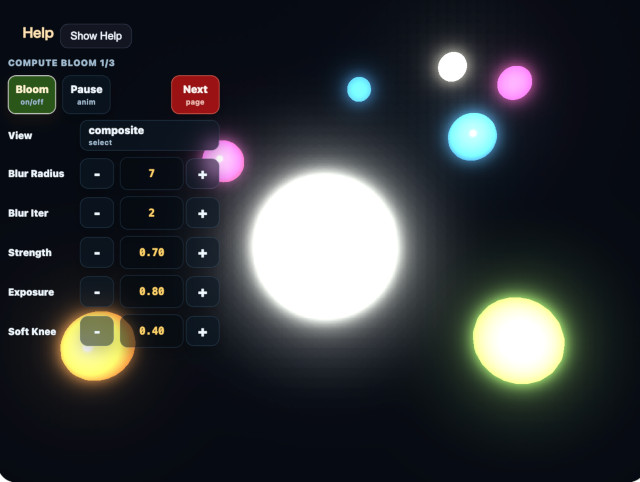
View cycles through scene / extract / half / quarter / eighth / sixteenth / thirty-second / blur / composite. extract is the full-resolution Bloom source, half through thirty-second are the raw downsample Levels, blur is the full-resolution result after progressive upsampling, and composite is the Tone-Mapped scene with Bloom. For a low-resolution Level, BloomDebugViewPass scales it with linear filtering and applies Reinhard and sRGB conversion for display.
Threshold selects the HDR brightness entering Bloom, while Soft Knee controls the smooth onset near the threshold. Strength controls how much reconstructed Bloom is added to the scene. Filter Radius changes the progressive-upsample tent spacing in coarse texels. A larger value spreads each Level farther, but it also changes how adjacent Levels overlap, so compare both the blur and composite views.
The second page exposes 1/2 Weight, 1/4 Weight, 1/8 Weight, 1/16 Weight, and 1/32 Weight. Raising a high-resolution weight strengthens the glow near a source. Raising a low-resolution weight emphasizes the weak outer halo. The 1/2 through 1/16 Levels retain their total weight of 1.0, and a 0.18 1/32 Weight is added outside them. This intentionally strengthens both the extent and total light for a highly scattering demonstration.
The default camera distance is 14.0, providing a closer view of the large center sphere and its surrounding Bloom. The center sphere animates from emission 0.60 to 0.95. Below it, fixed white probes range from 0.50 to 1.00 in 0.05 steps. Check that Bloom rises continuously near the threshold, thin bright sources remain stable at the 1/32 Level, and increasing the 1/32 Weight adds a smooth wide halo instead of a dotted pattern.
The core pass defaults are threshold=0.60, softKnee=0.40, strength=0.70, filterRadius=1.00, halfWeight=0.45, quarterWeight=0.28, eighthWeight=0.17, sixteenthWeight=0.10, and thirtySecondWeight=0.18. This sample overrides strength=2.00 so the weak outer halo is easier to inspect. Tone Map exposure=1.00 is not a Bloom-specific parameter.