collada_loader
English | 日本語
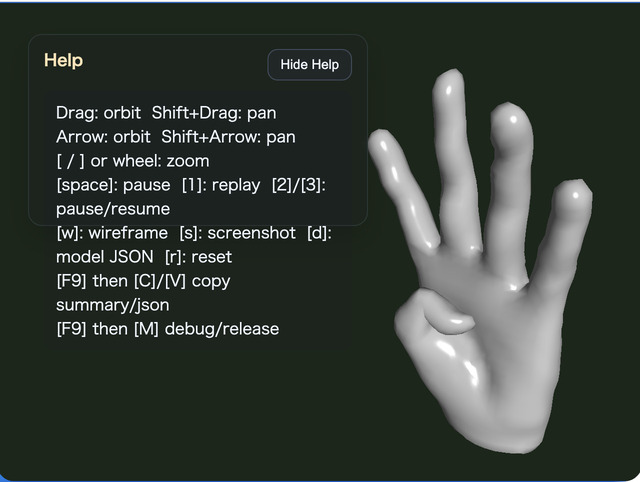
Overview
- This sample loads the Collada (
.dae) file specified inmain.js, normalizes it intoModelAsset, and then displays it - It calls the Collada facade from
WebgApp.loadModel()and demonstrates the shared entry point that covers everything from parsing to generatingModelAssetand runtime objects - The loaded
ModelAssetcan be downloaded as a JSON file with theDkey - When exporting Collada (
.dae) from Blender, the loader assumes files are exported inY-up - The loader's model-origin policy uses the skeleton root as the origin for skinned models and the mesh node as the origin for non-skinned models
How to Run
- Open ./collada_loader.html
- Use a browser with WebGPU support, and check the Help Panel and CommandPalette together with the sample when needed
webg Features Used
WebgApp: standard initialization, render loop, and Help Panel displayCommandPalette: groups animation control, wireframe, screenshot, JSON export, and camera resetWebgApp.loadModel: high-level entry point for the Collada facadeModelLoader: bundles DAE text load / parse /ModelAssetconversion / build / instantiateModelAsset: holds the data representation and supports JSON downloadModelAsset.getClipNames: inspects the clip list before buildModelBuilder: builds shapes, skeletons, and animations fromModelAssetModelBuilder.animationMap: accesses runtime animations from clip IDsbuild()result helpers:instantiate() / createNodeTree() / bindAnimationBindings() / getAnimation() / getAnimationNames() / startAllAnimations() / playAllAnimations() / setAnimationsPaused()EyeRig(type="orbit"): orbit viewpoint based on the bounding box
Processing Flow
- The sample calls
WebgApp.loadModel(COLLADA_FILE, { format: "collada" ... })and enters the Collada facade through the shared loader entry point ModelLoaderreads the DAE text and hands parsing and normalization toColladaShapeColladaShapegathers mesh / skeleton / animation / node data intoModelAssetformat- After that,
ModelBuilderassemblesShape / Skeleton / Animation / Node, and the sample uses the build result as the runtime - Unlike glTF, the Collada loader side does not have a static-bake plan, but the final runtime helpers still go through the shared
ModelBuilder
How to Read the Downloaded JSON
meta.sourceis expected to beCollada, andmeta.upAxisis expected to beYmeshes[]shows the result of converting Collada meshes into sharedModelAssetgeometry- By looking at
nodes[].animationBindingsandanimations[].targetSkeleton, you can confirm which clip is connected to which skeleton skeletons[].jointOrderstores the joint order referenced by skin weights and is also used when reconstructing through the builder- Comparing
animations[].tracks[].jointwithskeletons[].joints[].namelets you confirm whether track names match the restored bone names
Checkpoints
- Confirm that the DAE specified by
COLLADA_FILEis converted correctly into shapes, skeletons, and animations - Confirm that the Help Panel shows
file / model / orbit / target / anim / clip0 / wireframestate so the necessary viewer state can be followed on screen - Confirm that the sample uses the runtime returned by the facade and checks connections through
getAnimation()/getAnimationNames()instead of directanimationMapaccess - Confirm that the first clip can be restarted by name with
restartAnimation(clipId)using the1key - Confirm that
2 / 3can pause and resume the first clip individually withpauseAnimation(clipId)/resumeAnimation(clipId) - Confirm that the camera distance is set automatically from the model bounding box so the whole model is not clipped out in the initial framing
- Confirm that the JSON exported with the
Dkey can still be reloaded and displayed byjson_loader - Confirm that
Shift + ArrowandShift + Dragmove the camera target in parallel so fine details can be brought to the center - Confirm that
Wtoggles wireframe,Ssaves a screenshot, andRreturns to the initial framing - Confirm that the CommandPalette can run animation replay / pause / resume, wireframe, screenshot, JSON export, and camera reset
- Confirm that the Help Panel is used for current values and operation hints, while the CommandPalette is used for changing settings and running commands
- Treat DAE files exported from Blender with an up-axis other than
Y-upas outside the loader's assumptions; in that case, orientation mismatch is handled as an asset-side issue
Reading Points for AI / Users
- If "loading succeeds but the clip is not visible", first inspect
animations[]andnodes[].animationBindings - If "a skeleton exists but does not move", inspect the correspondence between
skeletons[].jointOrderandanimations[].tracks[].joint - If "you cannot tell which node corresponds to which mesh in the original DAE", use
nodes[].colladaMeshIndex - If "only the displayed position looks suspicious", suspect the loader's model-origin policy and the initial camera placement, and compare bbox-based framing with the pan behavior
Controls
- Drag / arrow keys: orbit camera rotation
Shift + Drag / arrow keys: pan the camera target- Mouse wheel /
[ / ]: zoom Space: pause animation1: replay the first clip2: pause the first clip3: resume the first clipW: toggle wireframeS: save a screenshotD: download theModelAssetJSONR: return the camera to the initial position based on the bounding box/or double tap the canvas: open the CommandPalette