bone_creature
English | 日本語
Overview
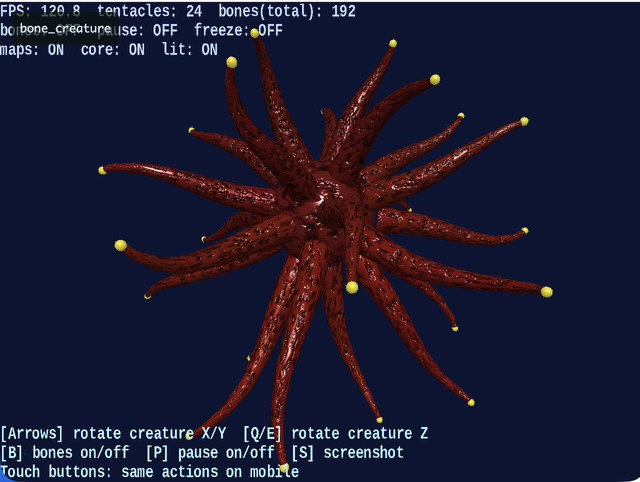
- This sample animates multiple skinned meshes (tentacles) at the same time so you can inspect bone deformation and the appearance of normal maps
- It is structured as a practical example of using
SmoothShaderfor "skinning + normal map"
How to Run
- Open ./bone_creature.html
- Use a browser with WebGPU support, and check the help panel and HUD together with the sample when needed
webg Features Used
WebgApp: standard initialization forScreen / Shader / Space / Camera / Input / MessageSkeleton / Bone: bone hierarchy and pose updatesShape + weights: the meshes that are deformed by skinningSmoothShader: lighting with normal-map support for bone-deformed meshesTexture: generates a height map and normal map from procedural noiseWebgApp.setGuideLines / setStatusLines: shows the operation guide and runtime statusTouch: rotation / action buttons for mobile devices
Checkpoints
- Confirm that the tentacles deform continuously while following the bone hierarchy, verifying that the weight setup and pose updates do not break
- Confirm that the density of the shading changes when the normal map is enabled or disabled, so the effect of introducing
SmoothShadercan be estimated - When bone display is enabled, confirm that the visible bone directions match the actual directions of mesh deformation
- Confirm that the guide is displayed at the bottom and the status at the top, so the sample also demonstrates a split between display roles
Controls
ArrowUp / ArrowDown: rotate the whole creature around the X axisArrowLeft / ArrowRight: rotate the whole creature around the Y axisQ / E: rotate the whole creature around the Z axisB: toggle bone display on or offP: toggle pause on or offS: save a screenshot